



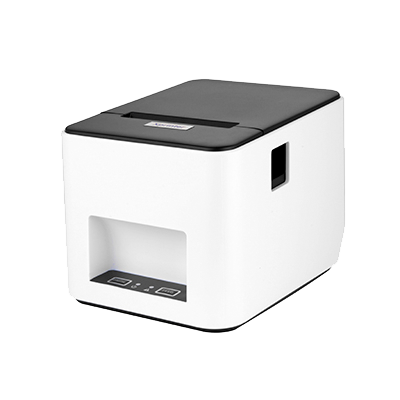


Product Overview
The Xprinter XP-420B is a POS thermal printer made for point of sale environments. It offers practical print speeds for daily receipt and label tasks so cashiers and staff can produce tickets, receipts or labels efficiently.

Technical Specifications
| Brand: | Xprinter |
| Model: | XP-420B |
| Product Type: | barcode printer |
| Print Technology: | Contact us for detailed specifications. |
| Paper / Label Width: | Contact us for detailed specifications. |
| Print Speed: | Contact us for detailed specifications. |
| Resolution: | Contact us for detailed specifications. |
| Interface: | USB. |
| Command / Driver Support: | ESC/POS or label printer drivers depending on model. |

Key Features & Benefits
Why Choose This Product?
It supports continuous operation during busy hours, so customers can receive receipts or labels quickly after each transaction.
Perfect For:
- ✅ Supermarkets and grocery stores printing receipts throughout the day.
- ✅ Restaurants, cafes and fast‑food outlets printing customer bills.
- ✅ Retail shops printing return receipts, coupons or barcode labels.
- ✅ Back‑office or warehouse desks printing labels for stock shelves and cartons.
Standout Specifications:
- ✅ Print Technology: Direct thermal printing for receipts or labels.
- ✅ Media Width: Supports typical POS receipt or label widths.
- ✅ Print Speed: Optimised for everyday POS receipt printing speeds.
- ✅ Resolution: Standard POS printer resolution for readable text and barcodes.
- ✅ Integration: Works with typical POS software through supported printer drivers.
Looking for more POS equipment? Browse our complete POS equipment collection including barcode scanners, receipt printers, and cash drawers at Al-Lewaa.

Setup & Installation
How to Get Started
- Connect the printer to power and to your POS terminal or computer using the supported interface.
- Install the printer driver recommended for the operating system used at your POS.
- Load the correct width of receipt or label media into the printer, following the media path marks.
- Print a test receipt or label from your POS software to make sure alignment and printing are correct.
Compatibility & Integration
Operating Systems: Typical POS installations based on Windows operating systems and other platforms supported by the device driver.
POS Software: Works with common POS applications that support standard POS printers or scanners.
Connection: Uses the documented USB, network or serial connection type of the specific model.
Frequently Asked Questions
What media width does this printer support?
A: It is designed for the media width indicated in the specifications of the specific model.
Does it have an auto‑cutter?
A: Cutter availability depends on the exact model variant and should be checked in the detailed specification.
What print speed can I expect in daily use?
A: The printer is built for typical POS receipt or label speeds so that customers receive documents quickly.
Which POS systems does it support?
A: It works with POS software that supports the printer driver or ESC/POS‑compatible printers.
Why Buy from Al-Lewaa?
- ✅ POS Specialists: Focused on equipment for shops, supermarkets and hospitality businesses in Egypt.
- ✅ Clear Descriptions: Each product is listed with practical POS‑oriented information.
- ✅ Support: Assistance is available to help you match devices to your POS system.
- ✅ Delivery: Shipping options across Egypt for businesses of different sizes.

Reviews
Clear filtersThere are no reviews yet.